Thursday, May 28, 2015

Human gives dying dog one last cross-country road trip

Poh-the-dog
Feed-twFeed-fb

When Poh, a mixed-breed dog living in New York City, received a terminal diagnosis from his veterinarian earlier this year, his owners set out to give their beloved pet a memorable final few weeks

Three months later, Poh and his owner Thomas Neil Rodriguez have completed a seven-week long cross country road trip, all documented on the dog's Instagram: @PohTheDogsBigAdventure.

More about Pics, Social Media, Pets, Dogs, and Cute Animals

4 Steps to Go Above and Beyond in Social Media Customer Service

Did you know that 25% of consumers who complain to brands on Facebook or Twitter expect a response within an hour, according to HubSpot? This seems a bit unrealistic, right? Shockingly enough, it might not be. You’ll likely lose respect and loyalty from a client if their questions and complaints aren’t dealt with in a short window of time.

 social media customer service image of a woman on her phone

Photo by Toshihiro Gamo via Flickr

Nowadays, customers even expect a response when complimenting a company. A few months back, I received a free salad from the organic fast-food restaurant SweetGreen due to a longer wait for chicken on my guacamole greens. I was so ecstatic by the phenomenal customer service that I tweeted at their corporate handle praising their response to a slightly extended wait time for my Friday night meal.

In return to my testimonial? Radio silence. I kept refreshing my Twitter feed assuming they’d respond in some manner, perhaps “favorite” my tweet, retweet it, or reply saying “Anytime!” but… nothing. I was left feeling discouraged (although I won’t lie, I’m still a regular salad-eating customer).

Luckily, this was a positive scenario, so I didn’t lose faith in the business, but imagine if my tweet was about a negative experience. Let’s say they ran out of chicken altogether and did nothing to ease my frustration. If a response was not made on Twitter to a negative review, then my faith and loyalty to the business would be lost.

Morton’s Steakhouse knows what I’m talking about. A while back, the upscale steak chain delivered a joking customer a free steak at an airport. The tweeter wrote, “Hey @Mortons – can you meet me at Newark airport with a porterhouse when I land in two hours? K, thanks.” And, to the customer’s surprise, Morton’s did just that!

The result? An explosion of PR coverage and positive press for the steak chain. The fact that this occurred in 2011 and I’m still gushing over it just shows how momentous positive social customer service can be for a business’ reputation.

Follow these steps to build loyal customers through social media:

Step #1: Assign a Social Media First-Responder

I understand that you might not have the budget to hire a new employee for this role, but you do need a socially active employee who is capable of responding and monitoring each one of your brand’s social channels.

As I explained above, customers (and leads) expect answers in real-time. A long lag between a tweet at your handle and your response will lead to high levels of frustration from your previously happy customer. Your social media first-responder should have notifications coming into their phone, and the ability to check in on each channel several times per day.

Step #2: Create a Troubleshooting Library

Common issues are going to occur no matter what industry you’re in, whether it be a bug in your software or a complaint about the delivery time for an e-commerce purchase. Make a detailed library of common occurrences with notes on how to handle each scenario. If the issue can’t be resolved overnight, let the user know this. Keep the lines of communication active, and send a private message with details on next steps (perhaps getting them in touch with support or scheduling a phone call to resolve the problem).

Step #3: Turn Your Customers into Brand Ambassadors Through Creative Tactics

You also need to think about the customers that aren’t likely to engage with your brand unless they have an issue. The last thing you want is people to only contact you under tense circumstances. How do you combat this? Turn on those creative juices and run intriguing contests and giveaways. Start a hashtag movement, ask engaging questions, and use humor through your social copy, images, and videos.

If you can spur your followers to positively interact with your brand, they’ll graduate from happy customers to brand promoters. Check out the adorable contest Delta Faucet is running below:

social media customer service screenshot of Delta Faucet's content on Twitter 

Step #4: Create a List of Your Customers & Engage with them Regularly

Keep track of who engages with your brand, who actively follows you, and the customers that spend lots of time on social media (which is likely the majority of them). Create lists of these customers, and return the love to them by retweeting or sharing their content, liking their posts, and commenting from time to time to show them how awesome they are. Making your customers feel loved goes a long way, although tread lightly with less happy customers; overdoing it with regular engagement might push them over the edge (nobody likes a suck-up!).

The most important takeaway? NEVER ignore any comment posted to one of your social accounts. Whether it be praising your brand or critiquing it, there’s no need to create brand detractors!

This post was originally published on socialmediatoday.com

About the Author:

Margot is a Content Marketing Specialist at WordStream with a background in PPC, SEM, content and digital marketing. Margot is passionate about writing and is also a regular contributor to socialmediatoday.com. She enjoys running and eating ice cream during her free time (not simultaneous although that would be impressive). Follow her on:

Twitter: @ChappyMargot

Google+: +Margot da Cunha

LinkedIn: http://www.linkedin.com/in/margotdacunha


Tips for Finding Your Best Content #socialtoolkit

Social Toolkit 28: Social Good and the Power of Content Marketing with C.C. Chapman. Check out the full podcast below or download it on Stitcher, iTunes, or Soundcloud to listen later.

Brought to you by:

The internet's easiest Lead Gen and landing page platform.
Performance marketing solutions to reach & convert your audience on social
The social media easy button for small business.
Where social marketers go to get inspired.

CC Chapman a New England based marketing consultant for social good. Author of Content Rules and Amazing Things Will Happen joins the show to discuss social good as a strategy, Give Local America, content marketing and why you don’t exist if you’re not creating content, photography as content, online learning technology/platforms, content discovery and more.

  • App of the week: Breather, beautiful, private spaces that can be reserved for any length of time – a short 30 minute recharge or an entire day of productivity. Spaces available whenever you need them.
  • Give Local America
  • Social Good as a strategy
    • How businesses are displaying social good as a strategy
    • Companies that are doing creative/clever work in the social good space
  • Content Marketing
    • Is ‘content marketing’ simply a “new trend” or is it something we’ve utilized for a while now?
    • Is it essential to have a content marketing strategy today?
    • Investing more in to real time content
    • Using photography within content marketing
    • Brands making great use of photography within their content marketing efforts
    • Where you should focus your efforts when using photo’s in your content marketing

“If you’re not creating content, you don’t exist in today’s world.”  
click to tweet

  • Online training, teaching, education, and learning technology
  • Content Discovery and Sharing
    • CC’s #1 location for content discovery
    • Zite as a discovery tool
    • How we should be using Zite regularly
    • How brands could make use of Zite

Website Analytics: How to use data to determine where to test

At MarketingExperiments, we use patented heuristics to evaluate websites, emails and other digital mediums. 

Often people think that a heuristic evaluation is a purely qualitative approach to a problem. This can be true, but when you combine quantitative analytics with the qualitative knowledge you increase the power to make meaningful change.

This post will show relevant metrics for three of these elements that any marketer — from beginner to advanced — can use to discover opportunities for improvement.

Step #1. Look at the qualitative elements of your website

Often people just ask for data dumps. To make matters worse, they want it in a very short time. On top of that, most data scientists use purely what they are comfortable with: numbers.

To add context and save time, you must evaluate the site to see where you should focus your data analysis.

Put yourself in the customer’s mindset and go to your site. If you own creative or design, try to remove those biases as best as possible. What makes sense to you or feels like the right amount of information may be completely overwhelming to a customer who isn’t familiar with your product or industry.

Look for things that are broken, functions that are clunky, images that don’t make sense or add value and difficulty in completing the conversion. You must objectively look at all the pages in the conversion path and be familiar enough with them to make sense of the data that you pull.

Pull data to illuminate the points you saw to give validity to the theory. Key heuristic elements and data help prove the problem.

Step #2. Understand motivation

Motivation cannot be affected, but it can be matched.  Use the traffic reports below to determine who is coming, how they are coming and why they are coming.

Sources and mediums

The source is the specific place where the traffic originated and the medium is the type of traffic. Google is an example of a source, and the medium would segment this traffic by direct, organic, paid, email, etc.

Knowing where the traffic is coming from tells us about:

  • The types of users — For example: young, old or tech savvy
  • User brand awareness — Having more organic than paid traffic can mean users already know you and your products.
  • Email — Users are on a list and have engaged with you before.

Keywords

Match the motivation of search traffic by looking at what keywords were used to find the link to your site.

If the majority are branded, then you can spend less real estate on your site telling people who you are with primary level value proposition. If the majority is nonbranded, then you know you must put value proposition about your company and products directly in the customer’s eye-path.

Next level

Look at the landing pages people visit most often, and look at the bounce and exit rates. If these are high, you haven’t aligned with the motivation of the visitors.

Step #3. Insert value proposition

There are four main levels of value proposition:

  • Primary — about your company
  • Product — about your available offerings
  • Process — what steps need to be taken to convert or what happens post conversion
  • Prospect — telling potential customers why they should be doing business with you

It is important to use value proposition in the right place to increase the perceived value of the offer as you increase the perceived cost — which could be taking action or giving personal information.

Previous page

Look at pages such as “About Us,” “Contact Us” and “FAQ” and run a previous page report. This will show you where visitors need more value proposition to keep them in the funnel.

You can take it a step further and see where visitors went next by running a Next Page Report, which shows the areas customers needed more information on.

Exit Page Report

Find your top exit pages and then look at them to see if there is value proposition on those pages. If there isn’t, then add the appropriate value proposition. If there is, maybe the value proposition needs updating. This update could be as simple changing as where it is and what it says.

To understand what goes into a proper value proposition, review these five questions from a MarketingExperiments interview with Michael Lanning, the inventor of the term.

Scroll metrics

Often I see websites where the value proposition is on the page, but it is too low on the page or too outside the eye-path to ever be seen.

See how far people are scrolling on your pages to determine the placement of your value proposition.

Next level

Look at responses of customers to determine the best and worst aspects of your product(s) so that you can highlight the best and message against the worst. Also, look at your competitors and compare products so that you can highlight why your product is the best for the potential customer.

Step #4. Address friction

Friction is the amount of effort someone has to give to complete a conversion. Look at the key funnel steps and run these reports.

Every website has many friction possibilities, so focus on those specific to you. Look at form fields, product pages, carts, calls-to-action and other places that may be difficult to navigate.

“Previous” and “Next Page” reports are a great way to isolate friction. If you see that a high rate of visitors are bouncing between steps or between the cart and shopping, then some element of friction is most likely causing them to not want to complete the step. If people are going to the “Contact Us” page at the same point repeatedly, then they most likely have had enough with trying to complete the purchase online.

Form tracking

Set up events or click-tracking to help identify friction (especially for places where people enter information). If you see a high drop off rate at a particular part of the checkout, then the friction has overwhelmed the visitor. You can test shortening or removing information or explaining why the information is necessary.

Internal search traffic can also be used to help identify friction in the purchase process. If common search terms are product related, it is too difficult for the user to get the relevant information they are seeking. If it is mostly related to process, then you can address those elements in the purchase path.

You can follow Benjamin Filip, Manager of Data Sciences, MECLABS on Twitter @benjamin_filip.

You might also like

Beginner’s Guide to Web Data Analysis: Ten Steps to Love & Success [From Occam’s Razor]

Digital Analytics: How to use data to tell your marketing story [More from the MarketingExperiments blog]

Value Proposition: 4 key questions to help you slice through hype [More from the MarketingExperiments blog]

Value Proposition Development: 5 insights to help you discover your value prop [More from the MarketingExperiments blog]

Wednesday, May 27, 2015

7 AdWords Alternatives That Failed, Except For One

You know all those blog posts about increasing AdWords conversion rates 572%, getting on Product Hunt 4 times in one day, and securing VC funding by hiring a sign spinner?

This isn’t one of them.

I had hopes of writing one, but what we did instead was a freaking mess.

Well, almost.

As a newborn AdWords focused agency, we wanted to use some other PPC channels to grow our email list and clientele.

Pretty ironic, right?

Now, you may be one of the very few advertisers who have plateaued their success on AdWords and just can’t squeeze any more profit out of the largest ad network in the world.

If so, you’re about as rare as the Taylor Swift “pegacorn.”

A photo posted by Taylor Swift (@taylorswift) on

For those of you who have no idea what a pegacorn is, it’s a pegasus and unicorn mix.

Yes, they are very rare indeed.

But this post isn’t about AdWords. It’s about the other avenues you can use to drive more leads, conversions, and sales to grow your business; hopefully, by an extra 572%.

The AdWords alternatives we’re going to cover today aren’t exactly search engines. In fact, they’re more like AdWords display network alternatives that get results through demographic targeting.

See, we didn’t want to use the alternatives that people have already talked about. We wanted to seek out some new ad channels that haven’t been written about that much.

Facebook was obvious, so we didn’t want to do that.

Bing Ads was obvious, so we crossed that one out.

In this post, we’re not going to just be looking at 7 AdWords alternatives, but what we did to fail, so you can learn from our mistakes.

Let’s get started.

Picking Our Lead Magnet

As with anything marketing, if your offer is crap, then no beautifully designed landing page can save you.

We knew we had to create a lead magnet that would get people excited, and if we’re smart, a lead magnet that hadn’t been created before.

Throughout my years of doing AdWords, I’ve always been asked the question: “What can we do to get more phone leads?”

Since there hasn’t been a lot written on the topic, I thought that was a brilliant idea.

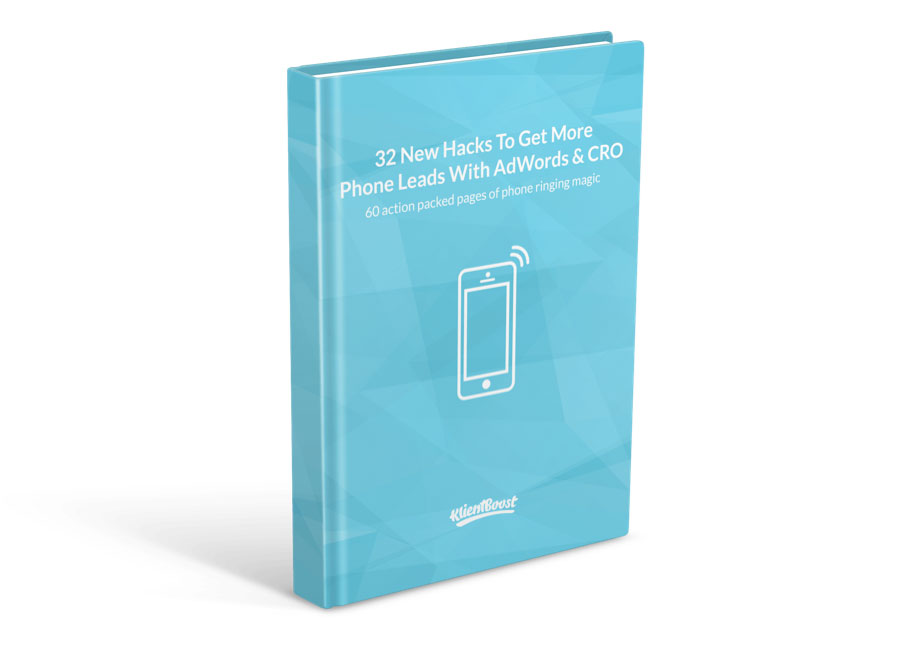
So, we created a guide on how to generate more phone leads with AdWords and Conversion Rate Optimization.

It ended up being 60 pages long, with 32 different ideas on AdWords and conversion optimization.

the-lead-magnet

So, once we had our guide done, we needed to create a landing page.

We studied other guide/ebook landing pages and also read up on Eric Sloan’s “8 Examples of What Not to Do On Your Ebook Landing Page“.

We eventually ended up with this masterpiece of a landing page: http://grow.klientboost.com/get-more-phone-leads/.

Finding a Partner and Upsetting a Few People

With the guide and landing page done, we knew we could make it even more successful if we found a bigger company/partner to help with the promotion.

Since the guide is about generating more phone leads, what better company than a call tracking analytics solution?

In the PPC industry, call tracking has become more and more popular in order to understand which keywords, ads, and placements are making the phone ring.

So, I did what anyone else would do, and got a little ahead of myself.

I started reaching out to all the well-known call tracking companies, at the same time.

It was a huge mistake.

Companies like CallRail, DialogTech (formerly IfByPhone), Invoca, CallTrackingMetrics, Marchex, CallSource, and Century Interactive all got an email from us with a custom made image like this:

callrail-klientboost

Since we’re a small and new company, we didn’t think anyone would say yes.

But, everyone said yes.

We eventually looked at employee counts and funding numbers on CrunchBase to decide who we should partner with.

It wasn’t an easy decision, but we hit it off really well with Invoca and found out they were a nearby company based in Santa Barbara, CA. They also sport some serious clients (which we’ll talk about later).

With the guide done, the landing page done, and the partner done, it was on to the AdWords alternatives:

#1 – Reddit Ads

Reddit has a very engaged and smart community of visitors, but their ad platform is horrible.

Within it, you get to decide which subreddits you want to target (which are smaller, more niche community pages that revolve around certain topics).

For our guide, we decided to target the subreddits of /PPC and /AdWords, but quickly realized that all ad slots were filled for the next three months.

Since Reddit allows only one ad spot per subreddit, the space quickly gets crowded.

We opted for the subreddits of /Advertising and /AdOps.

The results we’re pretty bleak:

bleak-results

We got 43 visitors and 2 guide downloads for a total of $51.14. That’s a $25.57 CPA.

impressions-vs-clicks-jd

We would’ve spent more if we’d had the chance to target the subreddits that were more relevant to our guide, but it’s hard to do when Reddit doesn’t tell you which days are available or open to advertise.

Now, that doesn’t mean that Reddit ads won’t work for you.

There are some (although few) examples out there of people who’ve successfully used Reddit ads to drive sales and conversions. One who sticks out is Ryan Luedecke.

He catapulted his beef jerky business and made $2,200 in sales from a $400 investment.

The story got shared quite a bit, and after reading what he did, it became apparent that what we were doing with our guide might not ever work if we didn’t get in front of the right audience.

As I mentioned earlier, Redditors are some super clever folks. They can’t stand self-promotion. Reddit ads seem to work the best when they’re not ads at all, but actual helpful content.

We moved on to the next one:

#2 – Yahoo! Gemini Ads

yahoo-gemini-ads

Yahoo! Gemini is Yahoo!’s answer to native advertising.

We’ve had some luck with this platform for some of our clients, so we thought it would be a sure thing for us.

phone-leads-guide-yahoo-gemini

We got 281 visitors and 2 guide downloads for a total of $212.24. That’s a $106.12 CPA.

Within the Gemini platform, you can set your campaign around one of three goals:

  • Visit my website
  • Know my brand
  • Download my app

We chose “Visit my website” and created an ad we wanted to run.

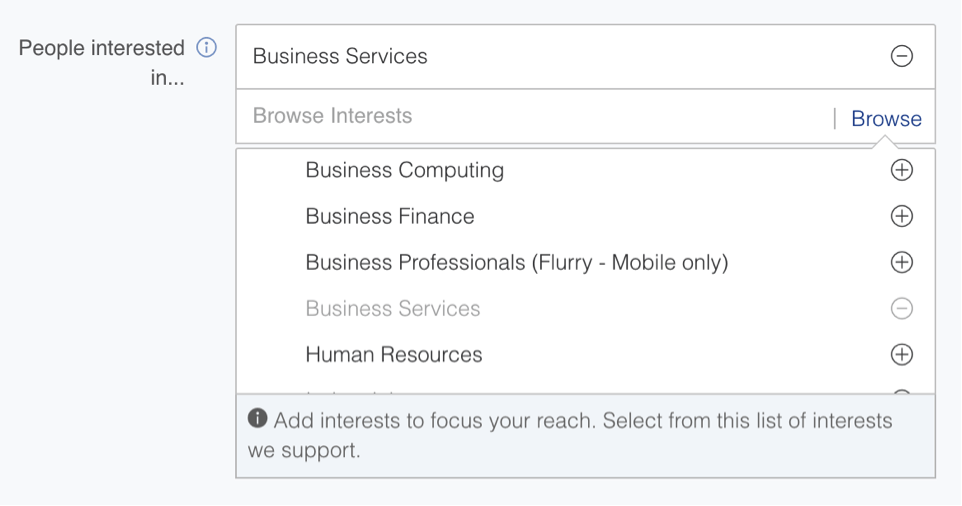
Then we got to choose the targeting method and opted for People interested in > Business Services > Business Services.

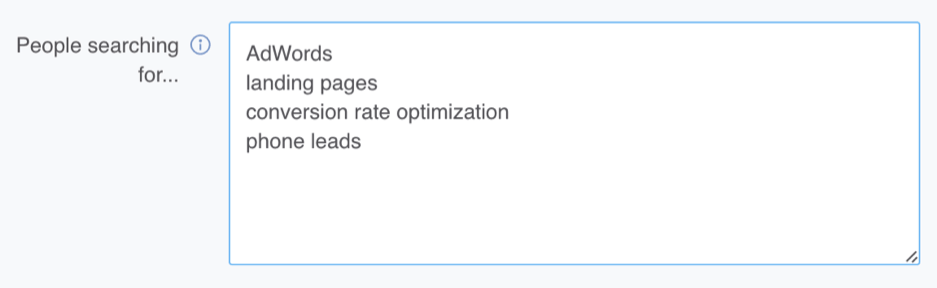
And just to make sure we had a little control, we threw in some keywords for people searching for:

people-searching-for-box

So, what happened?

Yahoo! Gemini ads are not the most targeted ads and, just like Reddit Ads, seem to work best when they fit within the topics on the page being covered.

Obviously, the keyword intent from the Google AdWords search network isn’t the same as this platform’s.

But, with banner blindness doing nothing but increasing, native advertising like the Gemini platform is set to continue to see growth.

ads-screenshot-man-holding-cc

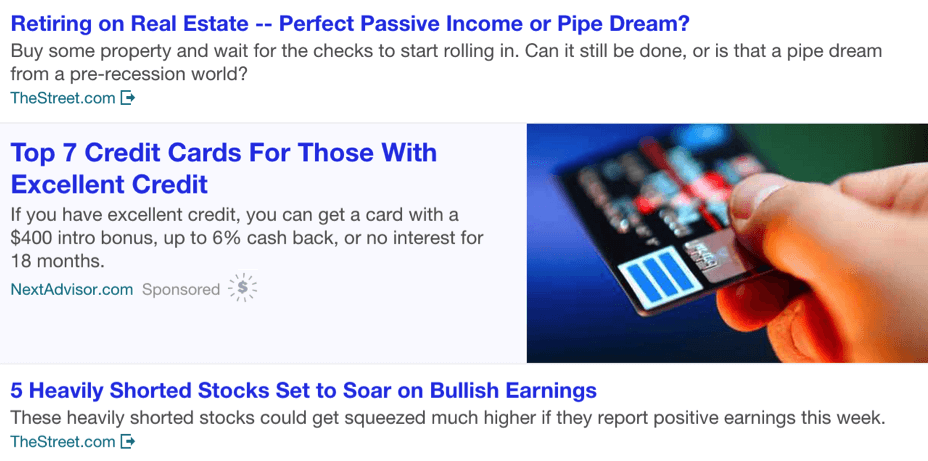
Here’s an example of what a Yahoo! Gemini ad looks like

The third time was the charm:

#3 – Twitter Ads

Okay, so we struck out twice, but we were only $263.38 in.

Next up was Twitter ads and, boy, we had a much better experience.

We got 297 visitors and 49 guide downloads for a total of $198.15. That’s a $4.04 CPA.

phone-leads-guide-new-twitter

So, what happened?

What we found was that the Twitter audience was much more engaging and interested in the problem we were helping them solve.

We targeted followers of notable blogs like Unbounce, KISSmetrics, and competitor AdWords agencies. We found that most of the downloads came from other agencies, not client prospects.

So, even though we had a lower CPA, we couldn’t convert those acquisitions into customers, just maybe some new fans.

But, don’t let that stop you.

Twitter ads have been growing in popularity, and it’s a killer ad platform when you focus on leading your ads with education and value.

interest-over-time

That’s a steady increase in interest

You’ll also find no shortage of case studies and in-depth posts on how to drive conversions with Twitter.

This is one of the better AdWords alternatives out there.

What was next?

#4 – BuySellAds

Okay, so we were beginning to see a trend as to why our guide wasn’t performing as well as we’d hoped (we’ll cover that at the end). But, that wasn’t going to stop us from continuing our experimentation.

Next up was the media buying platform of BuySellAds.

BuySellAds allows you to buy impressions on a cost-per-thousand impressions (CPM) bidding basis from high-quality publisher sites that don’t want to be cheaper out from the Google AdSense network.

Since, at this point, we understood that most of our downloads came from marketing agency people, we thought the next perfect targeting would be the Search Engine Journal (SEJ).

phone-leads-guide-search-engine

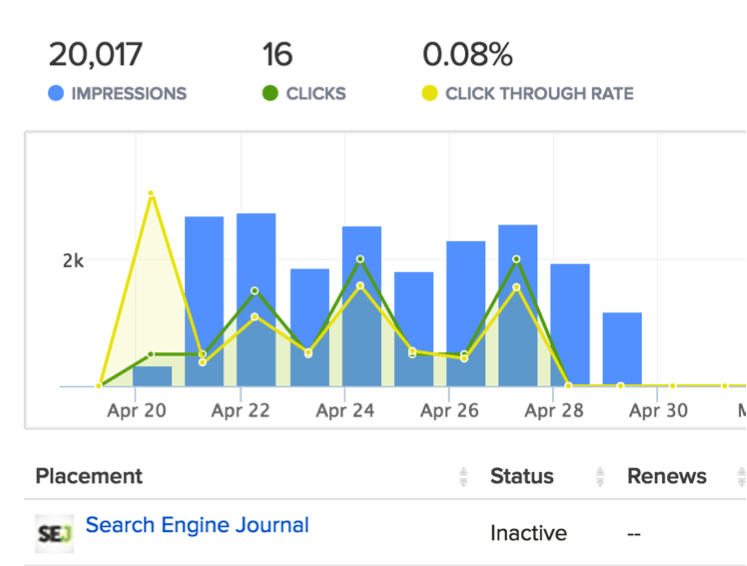
We got 321 visitors and 2 guide downloads for a total of $240. That’s a $120 CPA.

It was far from our Twitter ads success earlier.

Here’s a look at the internal BuySellAds dashboard and the low click-through rate:

search-engine-journal-stats

Now, the cool thing about BuySellAds is that you have a ton of options when it comes to “thought-leading” type of sites.

The downside is that you buy a high-priced, fixed number of impressions that usually work best with low friction/valuable content that gets people into your marketing funnel really early.

Most likely, those people are not in “ready-to-buy” mode.

Something to keep in mind as you’re paying via CPM is to select ad spots that are above the fold.

If not, you stand the chance of racking up your impressions with even fewer people actually seeing your ad.

#5 – StumbleUpon Ads

StumbleUpon is such a fun and awesome site for mindless swiping.

Kind of like Tinder, but for whatever topic you’re into.

The great thing about StumbleUpon ads is that you can really get some high volume visitors and, if you’re lucky, some great engagement.

We got 528 visitors and 5 guide downloads for a total of $100. That’s a $20 CPA.

But, we just didn’t see that engagement.

In fact, the average time on site from a StumbleUpon visit wasn’t even one second.

It was less than one second.

stumble-upon-stats-so-rude

I didn’t even know Google Analytics could be that rude

Was it because our landing page was that boring or because the first impression was that bad?

Or, was it because we shouldn’t expect to use StumbleUpon ads as a conversion tool, but as more of a blog discovery tool, as this KISSmetrics article suggests.

#6 – LinkedIn

Okay, by this time, we had definitely realized that we might have picked a guide topic that was a little too niche.

But, to give it one last go, we headed over to LinkedIn and tried to target the people who would love more phone leads – sales people.

phone-leads-guide-new-linkedin

We got 22 visitors and 5 guide downloads for a total of $113.07. That’s a $22.61 CPA.

Okay, not that bad, but definitely not sustainable either.

Even though the campaign ran for only about a week, we saw decent CTRs of 0.521%, which is pretty high for LinkedIn. Still, it just didn’t make sense to keep running as the cost per click was around $7.54.

So, it was on to the best AdWords alternative of them all:

#7 – Partner Promotion

Remember that I mistakenly asked all the call tracking analytics companies to join forces with us at the same time? And that we ended up going with Invoca?

Well, not only did we create an awesome partnership that could continue to grow in the future, but Invoca sent out our 60-page guide to their entire email list.

Results?

phone-leads-guide-new-invoca

We got 774 visitors and 343 guide downloads for a total of $0. That’s a $0 CPA.

Invoca sent almost 400 downloads to recipients who included marketing department people from companies like PayPal and Allstate Insurance. Those people got on our email lists and are still there, interacting with our emails and our blog posts.

We also secured a speaker for our #CRODay meetup that we held at our office in Costa Mesa, CA.

Who knows what the future will hold.

What We’d Do Differently Next Time

We quickly learned not to create a lead magnet that fits a narrow audience.

We could’ve created a much beefier guide on AdWords as a whole or some unknown landing page hacks that would appeal to a broader audience.

Instead, we took the route of specificity and didn’t get as many downloads as we had hoped.

Also, because we were so aggressive with so many different AdWords alternatives, we didn’t prepare to create additional unique ad copy or imagery to go with every channel.

I’m sure we could have gotten much better results through iterative testing and constant tweaking.

Conclusion

All together, we got 2266 visitors and 408 guide downloads for a total of $914.60. That’s a $2.24 CPA.

Since many people want to learn something brand new, make sure your content/guide tries to accomplish that, or paints old information in a different way.

Take these AdWords alternatives with a grain of salt and understand that each channel takes time to perfect.

Don’t test the depth of the river with two feet.

About the Author: Johnathan Dane is the founder of KlientBoost, a California based PPC agency that’s on a mission to grow companies. He’s been interviewed by Google and has a German Shorthaired Pointer named Tanner. Connect with him on Twitter.

Using Emojis in Ad Text Boosts CTR!

Emojis have become ubiquitous in text messages, private online messaging, and even blog posts and other written communications. But did you ever think Google would allow them in AdWords ads?

Emojis in ad text

We recently discovered that AdWords is, in fact, allowing emojis in some ads. Our data scientist Mark Irvine ran some tests this week using (willing) client accounts and we have some early - and promising - results to share.

Mark noticed that there was no real rhyme or reason as to which emojis were accepted and which were rejected by Google as “punctuation errors.”  He did get this one through for testing and as you can see, it was served about 10% more than the non-emoji ad. It also received 4 clicks to the other ad’s 0!

Emojis in ad text click-through rate comparison

It’s not just smiley faces, either. What better way to sneak imagery into a text ad for a donut shop than with a donut emoji?

Emojis in ad text example

Advertisers have a lot more emoji options than smiley faces that they may be able to incorporate into their ad text. Check out this sampling of some of the more popular emojis below:
Emojis in ad text emoji list

As you can see, you've got your standard smileys, as well as some representations of various types of people (and professions). Look a little closer, though - notice the sheer variety of emojis you could put into your ad text? We've got body parts, hand gestures, clothing, animals (LOTS of animals), plants, technology, weather symbols, the phases of the moon, and a whole bunch of chart, graph and app icons.

You may notice that the ubiquitous "smiley face poop" emoji isn't in this list. (I'm not sure you'd have much luck getting that one past Google in an ad anyway.)

Have you seen any emojis in PPC ads? Would you consider using them yourself?


grade your adwords account